
Communities rally around causes — disaster relief, a new park, a school program, a public event. A donation campaign on your own official website keeps that fundraising trusted and on-brand, instead of sending people to a third-party platform. This guide shows how to run donation campaigns in WordPress with GiveWP, which the Egovt theme bundles and styles for you.
What a good donation campaign needs
- A clear cause and goal, with a visible progress bar.
- Preset amounts plus a custom-amount option.
- A simple, trusted checkout on your own domain.
- One-time and recurring giving options.
- A receipt and record of every donation.
Setting it up with GiveWP in Egovt
Egovt installs and integrates GiveWP, a leading free donations plugin, and includes styling so the forms match your government site out of the box.
1. Install and enable GiveWP
When you activate Egovt and run its recommended-plugins step, GiveWP is installed alongside the theme. You’ll find a new Donations menu in the WordPress dashboard.
2. Create a donation form
Go to Donations → Add Form, give the campaign a title and description, then configure:
- A donation goal so supporters see progress.
- Donation levels (preset amounts) plus an optional custom amount.
- One-time and recurring options.
- Your payment gateway (for example a card processor) under GiveWP settings.
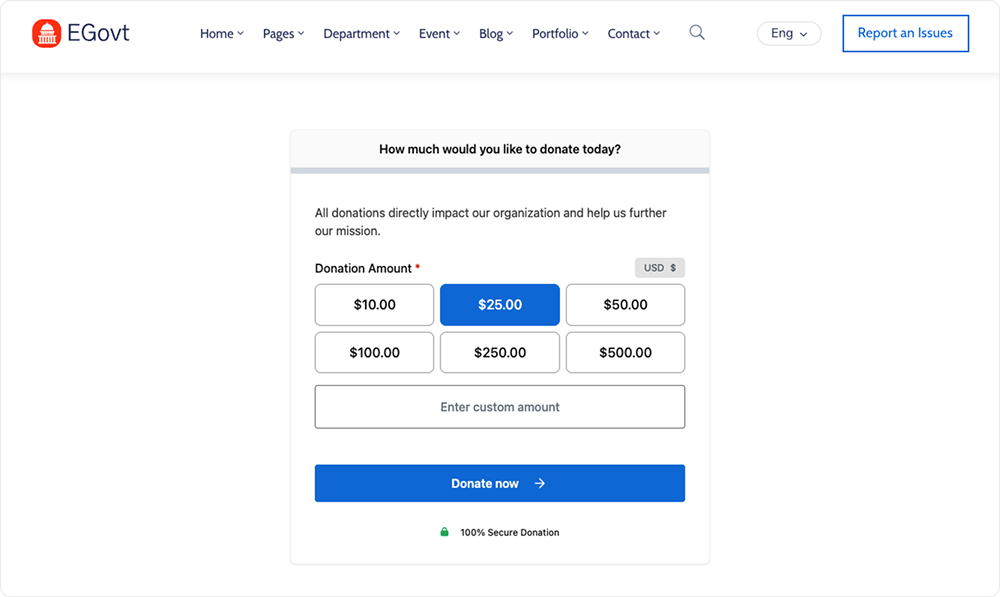
3. Publish the campaign on a page
Embed the form on any page using the GiveWP block (or shortcode) in the editor, or drop it into an Elementor layout. Because Egovt styles GiveWP, the form matches your header, colors and buttons without extra work.
4. Track donations
GiveWP records every gift under Donations → Donations, with donor details, reporting and receipts — so you can report back to your community on how much was raised. Promote the campaign alongside a related city event to boost participation.
Tips for successful campaigns
- State exactly what the money funds and set a realistic goal.
- Keep the form short — fewer fields means more completed gifts.
- Offer a recurring option for ongoing programs.
- Share progress updates to keep momentum.
A donation campaign is often just one feature of a wider government website. Most sites run it alongside public services, a department directory, a document center and an events calendar, all tied together by a clear structure. If you still need to build the rest, our complete guide How to Build a Government Website With WordPress covers the whole process from start to finish.
Why we’d start with Egovt
Egovt integrates GiveWP and styles it to match your site, alongside services, events and departments — all in one $49 theme. See the live demo.
Frequently asked questions
How do I add donations to a WordPress website?
Egovt bundles GiveWP. Go to Donations → Add Form to create a campaign with a goal and preset amounts, then embed it on a page with the GiveWP block or shortcode.
Is GiveWP free?
Yes, GiveWP has a free core plugin that handles donation forms, goals and gateways. Egovt installs it and styles it to match your site.
Can I accept recurring donations?
GiveWP supports one-time and recurring giving, so you can fund ongoing community programs, not just one-off appeals.
Do donations stay on my own website?
Yes. With GiveWP the entire donation flow runs on your official domain, which keeps fundraising trusted and on-brand.
