
WP Mega Menu Builder
Turn crowded navigation into a clear, multi-column WP mega menu that visitors can scan in seconds, giving any site a faster and more organized browsing experience.
For 1 Site
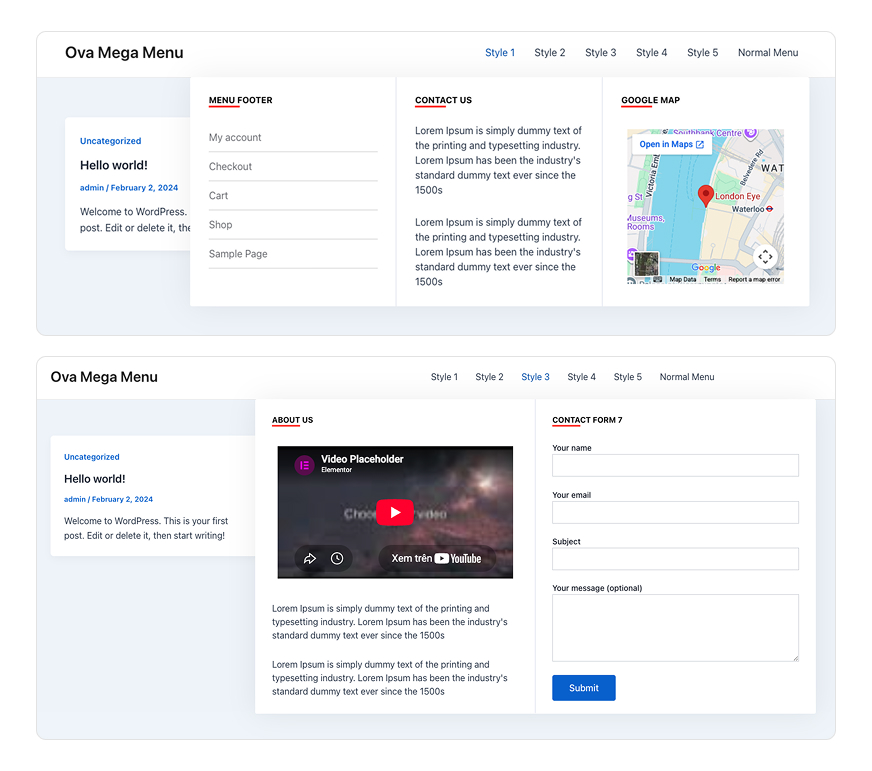
Popular Use Cases
Turn crowded navigation into a clear, multi-column WP mega menu that visitors can scan in seconds, giving any site a faster and more organized browsing experience.
eCommerce & online stores
Show product categories, collections, and promo banners in a wide WP mega menu so shoppers reach any department in a single click.
Blogs & magazines
Organize dozens of categories and featured posts into tidy columns, giving readers a structured WordPress navigation menu across your content.
Corporate & business sites
Present services, solutions, and team pages in a clean multi-column WP mega menu that keeps a large site easy to explore.
Portfolios & agencies
Use the drag and drop mega menu builder to group projects, case studies, and contact links with custom styling that matches your brand.
Online courses & LMS
Lay out course topics, lessons, and resources in an organized WP mega menu so learners always know where to go next.
Restaurants & local business
Display menus, locations, and booking links in a responsive WP mega menu that looks sharp on both desktop and mobile.
Core Value
Everything you need to design custom navigation is built in, letting you create a responsive, well-structured WP mega menu visually without writing a single line of code.
Drag-and-drop row & column builder
Add rows, insert columns, and resize their widths by dragging to design any WP mega menu layout directly in the WordPress dashboard.
Multiple content widgets
Fill each column with text, headings, menu items, shortcodes, or the WYSIWYG editor to embed almost any content inside your menu.
Full-width or container layouts
Choose how each WP mega menu spans the screen and set its position (left, center, right) relative to the parent menu item.
Complete style controls
Customize background color, padding, borders, border radius, box shadow, and Google Fonts to perfectly match your theme.
Fully responsive
Set a custom responsive breakpoint so your WP mega menu adapts cleanly from large desktops down to mobile screens.
Native WordPress integration
Attach any WP mega menu to standard nav menu items via a simple shortcode, with support for pages, posts, custom post types, categories, and taxonomies.
Product Essentials
Everything you need to know about this WP Mega Menu Builder plugin before you buy.
-
1. What’s Included
- Plugin File
- Documentation
- Access to downloads
-
2. Compatible Browsers
- Chrome
- Firefox
- Safari
- Opera
- Edge
-
3. Compatibility
- WordPress Latest Version
- PHP 8.x
- PHP 7.x
- WooCommerce
- Elementor
- WPML
- Loco Translate Plugin
-
4. Documentation
-
5. Support
- Monday - Saturday
- 24h Response Time
- Support via Forum
- Support via Email
-
6. Changelog
- Version 1.0.3
- 14 July 2026
- Read changelog file
Version history
- N = new
- U = update
- D = dev
- F = fix
- R = remove
- O = other
-
7. License
- 12 Months Update
- 12 Months Supports
Need Help?
Our support team is here for you
14 Days Money Back Guarantee!!!
Get a full refund as long as your request meets the conditions in our refund policy.
Frequently Asked Questions
Do you have a question about product? See our most frequently asked questions. If your question is not listed below, please contact us.
Do I need coding skills to build a WP mega menu?
No. The entire WP mega menu is built visually with a drag-and-drop interface. You add rows, columns, and widgets and adjust styling from the dashboard without touching any code.
Is the WP mega menu responsive on mobile devices?
Yes. Menus are fully responsive, and you can set a custom breakpoint to control exactly when the layout switches to its mobile version.
Does the WP mega menu plugin work with any WordPress theme?
It integrates with the standard WordPress navigation menu system, so it works with most themes that use native menus. You attach a WP mega menu to a menu item through a shortcode.
What content can I add inside a WP mega menu?
Each column accepts multiple widget types — text, headings, menu item lists, shortcodes, and rich content from the WYSIWYG editor — so you can display links, images, and embedded elements.
Can I control the width and position of the WP mega menu?
Yes. You can choose a full-width or container layout and set the menu's position (left, center, or right) relative to its parent menu item.
Can I customize the design to match my brand?
Absolutely. You can adjust background color, padding, borders, border radius, box shadow, and Google Fonts for each WP mega menu.
Will the WP mega menu plugin slow down my website?
No. You can output CSS externally to a cached file to keep your markup clean and minimize the impact on page load speed.
Can I use the WP mega menu for WooCommerce or online stores?
Yes. It supports pages, posts, custom post types, and categories, making it a good fit for eCommerce sites that need to organize many product categories.
How many WP mega menus can I create?
There is no limit — create as many WP mega menus as you need and assign each one to a different menu item.
Can I add custom shortcodes inside a WP mega menu?
Yes. The shortcode widget lets you embed forms, sliders, or any shortcode-based element directly into a menu column.
Your Benefits
Everything included with your purchase.
-
Download the product package immediately after successful payment.
-
14-day refund policy
-
12 months of support and updates
-
Online documentation included
-
Secure checkout & instant access
Safe payment, instant access, and reliable support.
Review & Rating
See what customers think about this wp mega menu plugin — real ratings and reviews to help you buy with confidence.
Add a review Cancel reply
You must be logged in to post a review.

We sell WordPress digital products, including themes and plugins.
A highly flexible and customizable plugin that adapts easily to different needs. Its user-friendly interface makes it simple to set up and use, even without prior experience. Great combination of power and simplicity.