
WooCommerce Booking Plugin for Rentals and Services - BRW
The all-in-one WooCommerce booking & rental plugin for WordPress. Sell rentals, hotel rooms, tours, taxi transfers, appointments, and equipment with flexible pricing, deposits, and real-time availability — powered by WooCommerce.
For 1 Site
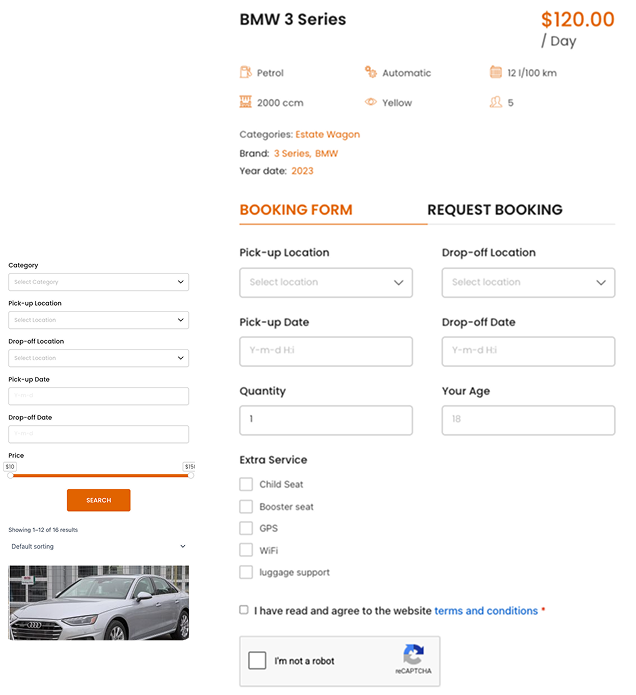
Popular Use Cases
One WooCommerce booking & rental plugin for many industries — car rental, hotels, tours, taxi transfers, equipment rental, and appointments — all on WordPress.
Hotel Booking
Turn WordPress into a complete hotel booking plugin for WooCommerce. Guests can check real-time room availability, apply seasonal pricing, and pay directly on your site — no need to redirect them to a third-party booking platform.
Car Rental
This WooCommerce car rental plugin covers everything from fleet management and multiple pickup/drop-off locations to automatic distance-based pricing. Ideal for both self-drive rental businesses and chauffeur-driven transport services.
Tour Booking
Manage tour schedules, set seat limits per departure, and apply group pricing with this WooCommerce tour booking plugin. Travel agencies can list multiple tour packages and let customers book and pay online instantly.
Transport & Chauffeur
Set up an on-demand transport, limousine, or taxi booking service right on WordPress. BRW automatically calculates fares based on distance and travel time, so customers know the cost upfront without calling to confirm.
Scooter & Bike Rental
A WordPress bike and scooter rental plugin built for shops renting by the hour or day. Customers book online, pick a collection time slot, and the system automatically checks availability to prevent double bookings.
Equipment Rental
Suited for businesses renting out tools and equipment by the day or week. The system tracks item availability, blocks conflicting bookings automatically, and supports security deposits before handover.
Spa & Clinic Booking
An appointment booking solution for spas, clinics, and beauty salons. Customers select a service, choose a preferred staff member and time slot, while owners manage every appointment from a single dashboard.
Event Item Rental
Rent out event items such as tables, chairs, sound, and lighting equipment based on actual usage time. Renters pick their required dates, the system calculates fees automatically, and flags items already booked for that period.
Other
BRW flexibly supports many ways of setting up pricing and accompanying attributes, so you can set up many different types of rental or booking models to suit your business.
Core Value
A flexible WooCommerce booking and rental system built for real business needs, from car and equipment rental to hotels, tours, and appointment services.
Flexible Business Models
Use one plugin for rentals, tours, transport, appointments, equipment, rooms, and service bookings.
Smarter Pricing Setup
Create pricing rules that match how your business actually charges customers.
Backend Booking Management
Manage bookings, availability, inventory, calendar views, manual bookings, sync orders, and order details from backend site.
Better Customer Booking Experience
Let customers book more easily with clear forms, guest details, custom fields, file uploads, extra services, and location selection.
More Revenue Opportunities
Sell extra services, resources, deposits, insurance, and add-ons during the booking process.
Powered by WooCommerce
Built on WooCommerce — your WordPress booking and rental store uses trusted checkout, payment gateways, orders, emails.
Flexible Pricing for Every WooCommerce Booking & Rental
Set rates by day, hour, period, route, distance, appointment, or tour — each product priced exactly the way your business charges.
Daily Pricing
Charge by day, night, or 24-hour rental period.
Hourly Pricing
Set prices based on the number of booked hours.
Mixed Pricing
Combine daily and hourly rates in one booking.
Period-Based Pricing
Create prices for hour ranges or day ranges.
Route-Based Pricing
Set fixed prices for specific pickup and drop-off routes.
Distance-Based Pricing
Calculate booking cost by kilometers or miles.
Appointment-Based Pricing
Set fixed prices for time slots or service appointments.
Tour-Based Pricing
Price tours by time slot, special day, or fixed tour date.
Accept Payments & Deposits
Take WooCommerce booking payments through your existing gateways, with flexible options for full payment or a deposit on every rental order.
Automatic Price & Fee Calculation
Every WooCommerce rental product calculates its price automatically. Fields appear based on the rental type you choose, so each business shows only the options it needs.
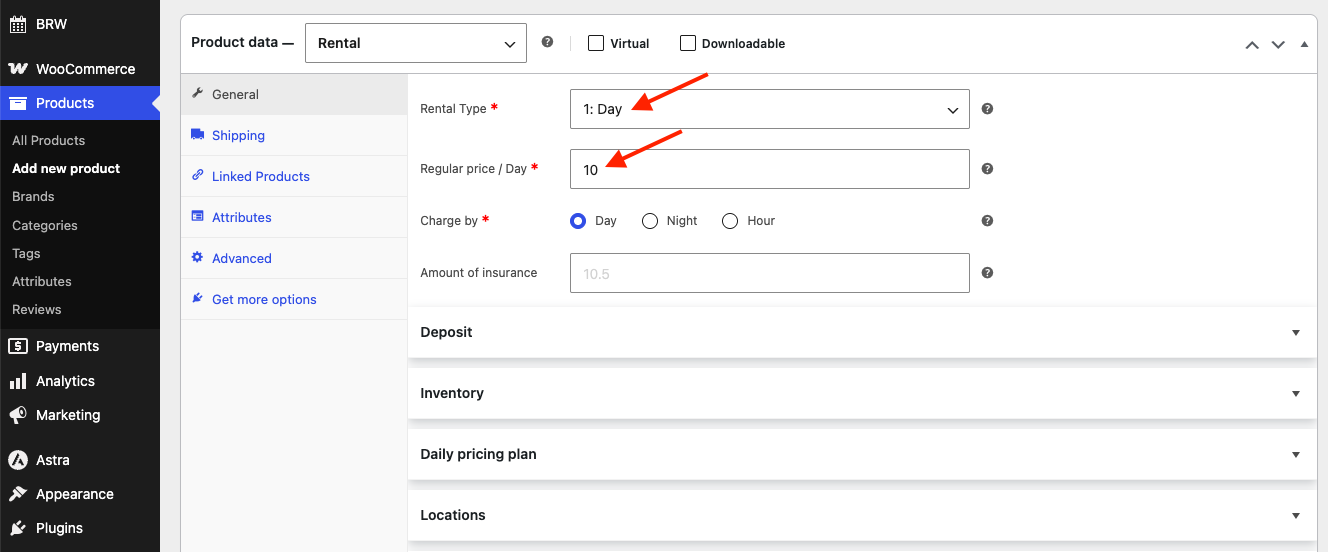
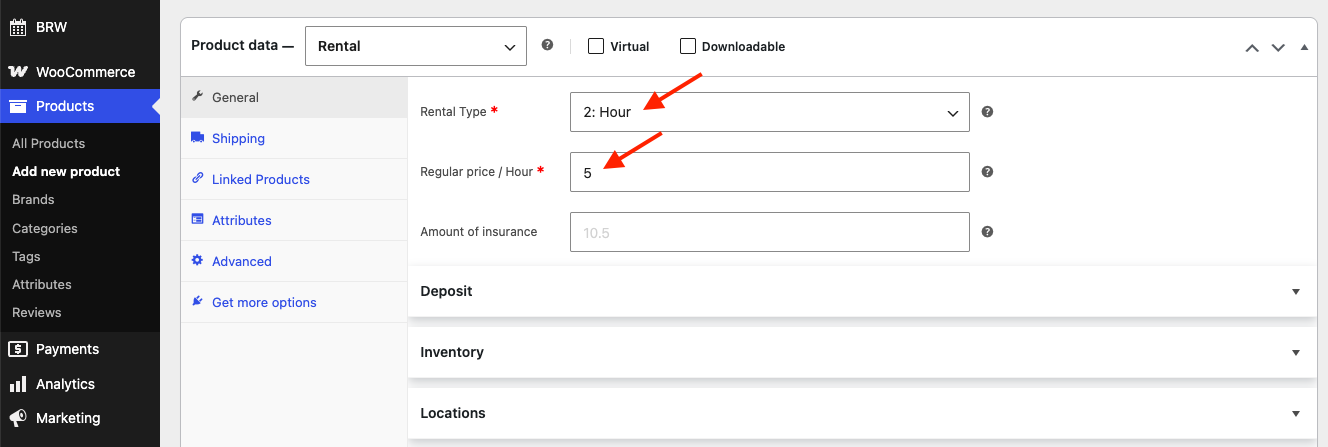
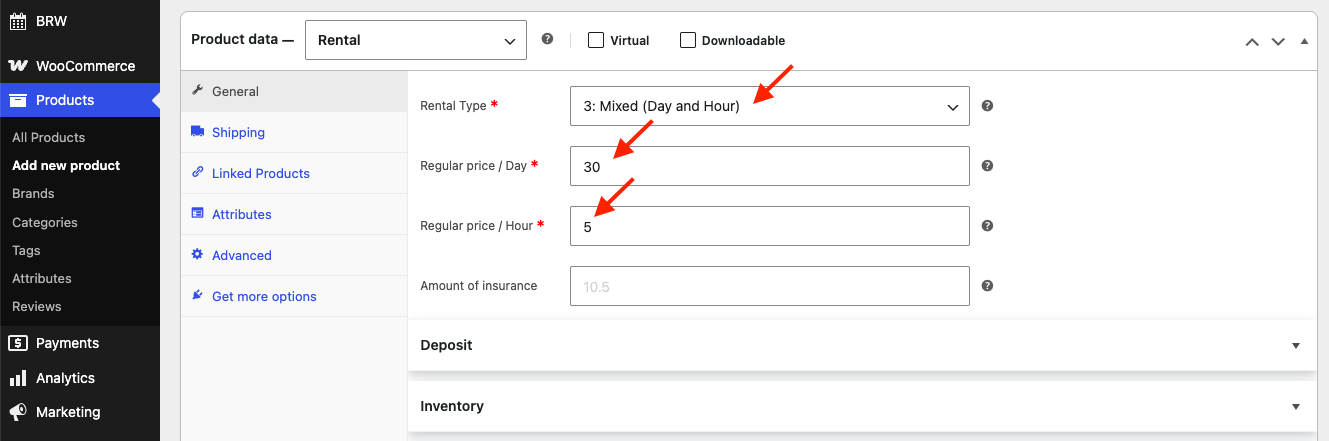
This is the only required pricing field. All other pricing rules build on top of this value.
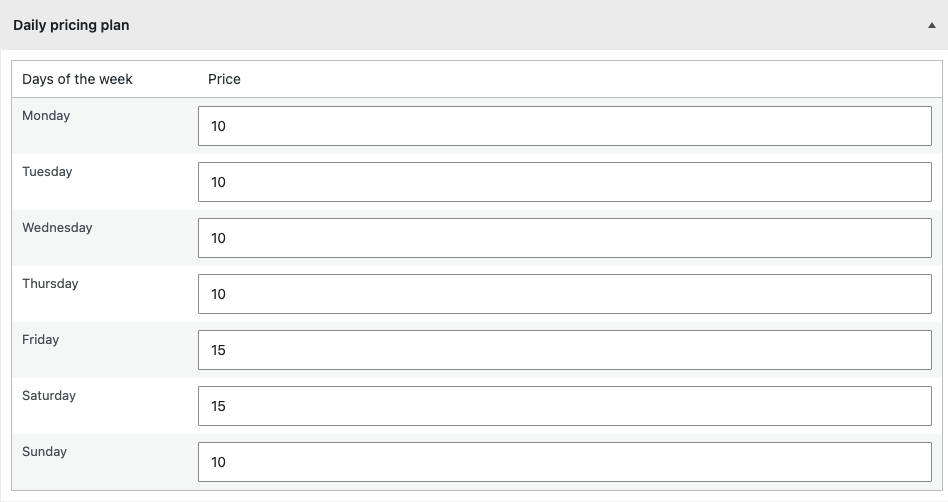
Daily Pricing Plan lets you set a different rental price for each day of the week — for example, charging more on Friday and Saturday to capture weekend demand while keeping weekdays lower. Just enter the price for Monday through Sunday and the system applies the right rate automatically based on the booking dates.
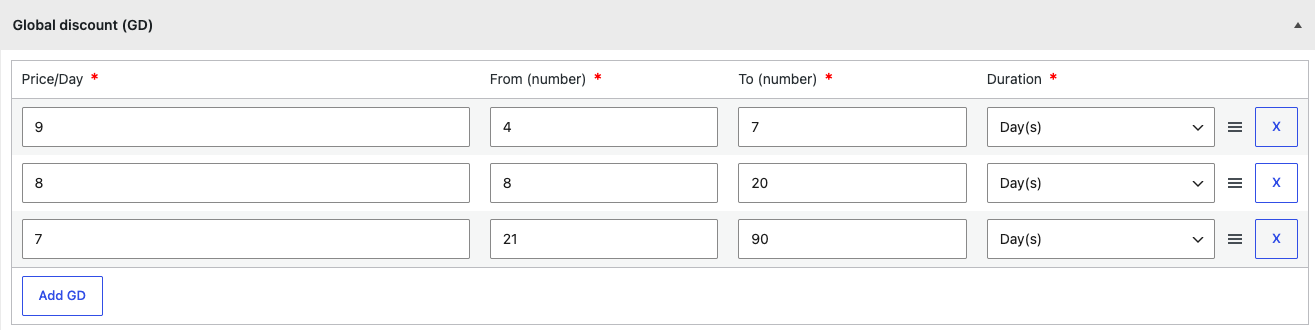
Global Discount (GD) lets you reward longer rentals with tiered pricing that applies across all bookings. Set a lower price per day for each duration range, so the longer a customer books, the cheaper the daily rate — encouraging extended rentals automatically. Add as many tiers as you need, and the system applies the right rate based on the booking length.
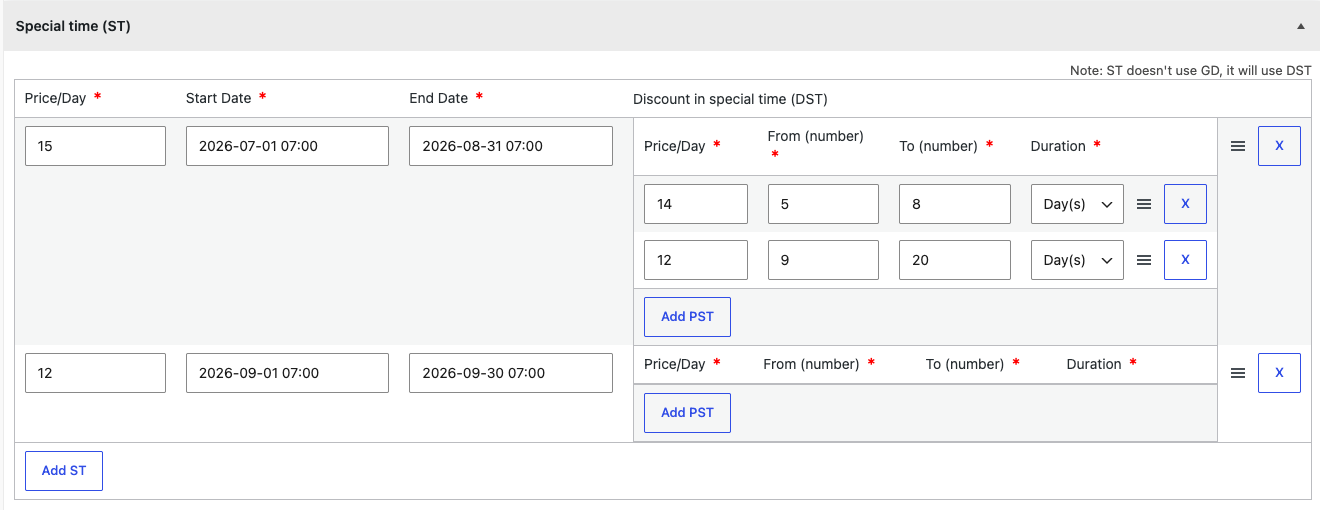
Seasonal Price (Special Time) lets you set custom rates for specific date ranges — such as peak or holiday seasons — by defining a price per day between a start and end date. Within each season you can add tiered duration discounts (DST): a lower daily rate that kicks in when a booking falls within a set range of days, rewarding longer rentals.
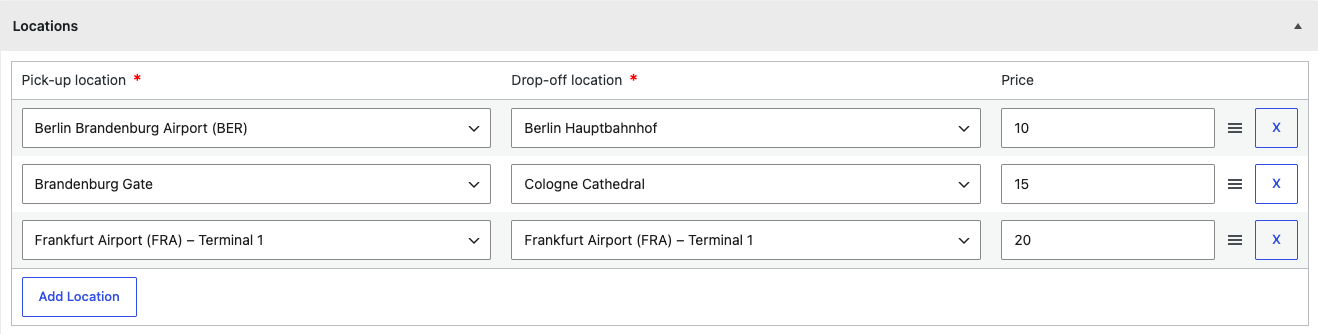
Locations lets you add a surcharge for each pick-up and drop-off pair. Define the routes your business serves and set an extra price for every combination, so a customer picking up at one location and returning to another is charged the correct surcharge automatically. Add as many location pairs as you need, and the fee is added to the booking total at checkout based on the route selected.
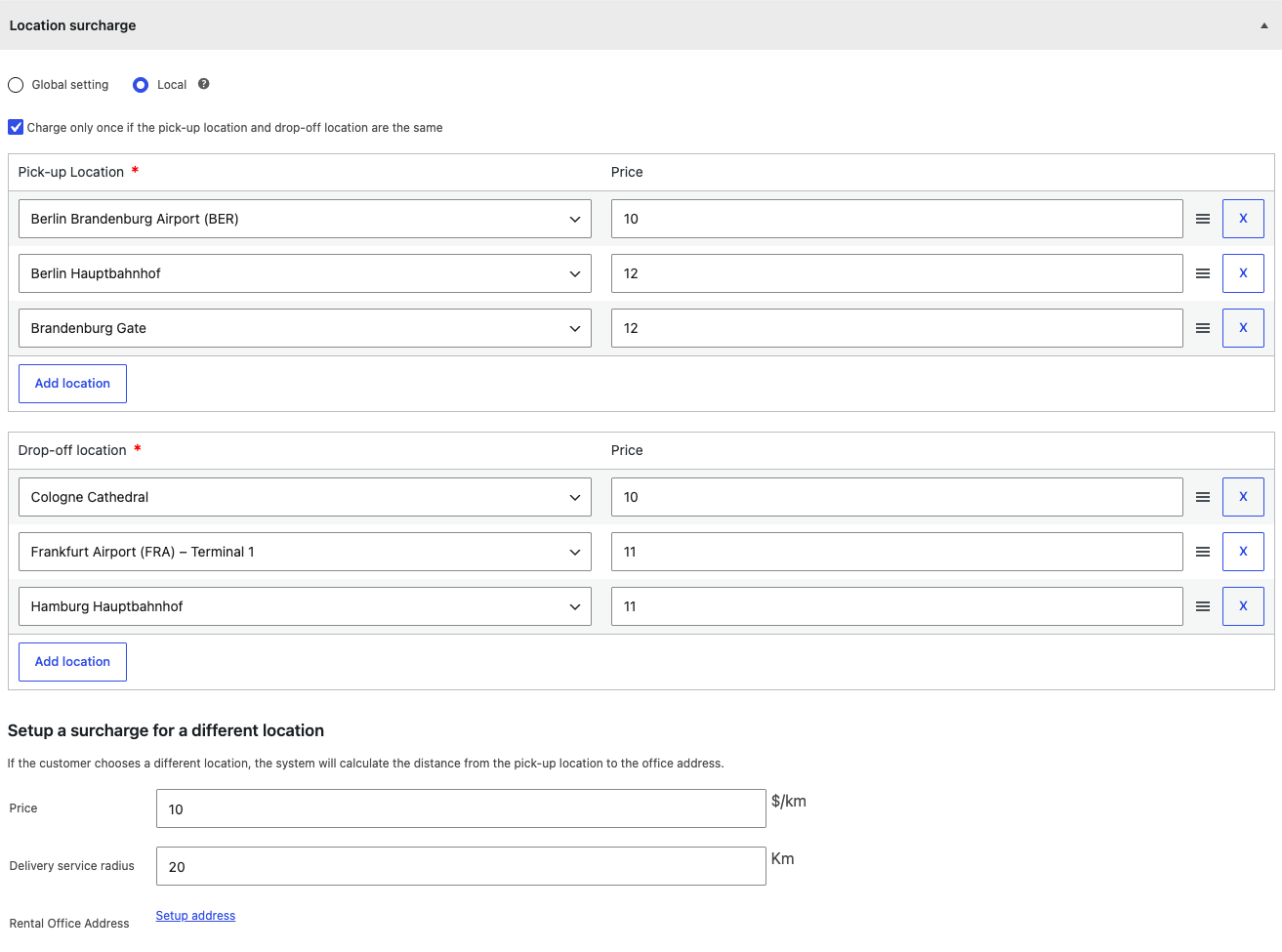
Location Surcharge lets you charge an extra fee for specific pick-up and drop-off points, using either a global setting or per-product local rules. Set an individual surcharge for each pick-up and drop-off location, and optionally charge only once when both are the same. For locations you haven't listed, the system can calculate a distance-based surcharge — a price per kilometer from the pick-up point to your rental office, limited by a delivery service radius — so custom drop-offs are always priced fairly.
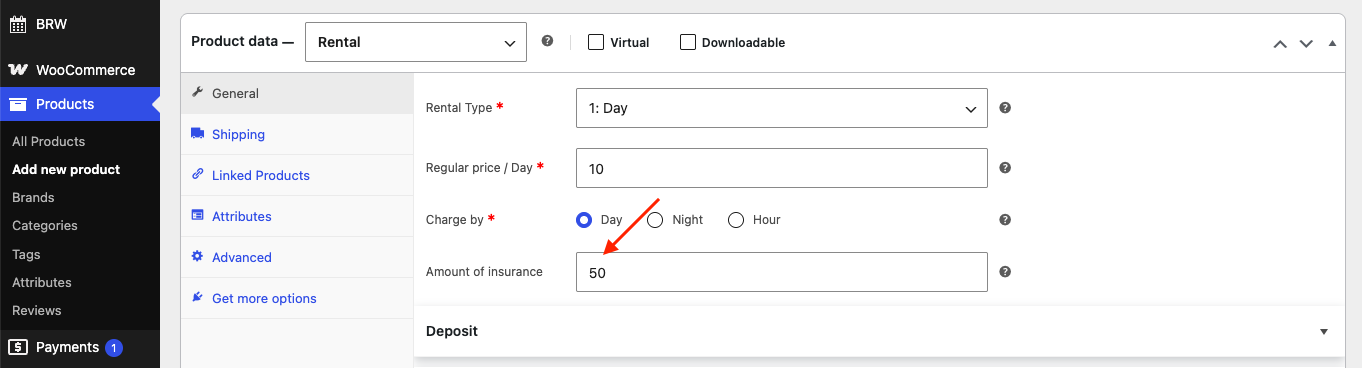
Amount of Insurance lets you set an insurance fee for each rental product. Enter the amount and it's added to the customer's booking total, giving both you and the renter added protection during the rental period. When configured as mandatory, the insurance is applied and shown by default at checkout, so it's automatically included in the final cost.
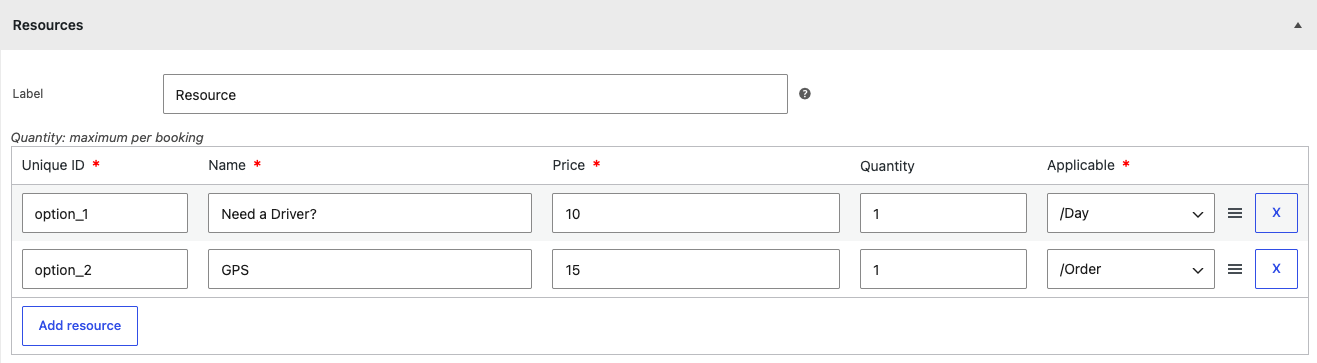
Resources lets you offer optional shared add-ons that customers can include with their booking, such as a driver or GPS. For each resource, set a unique ID, name, price, and the maximum quantity available per booking, then choose how it's charged — per day or per order. Add as many resources as you need, and their cost is added to the booking total automatically based on the customer's selection.
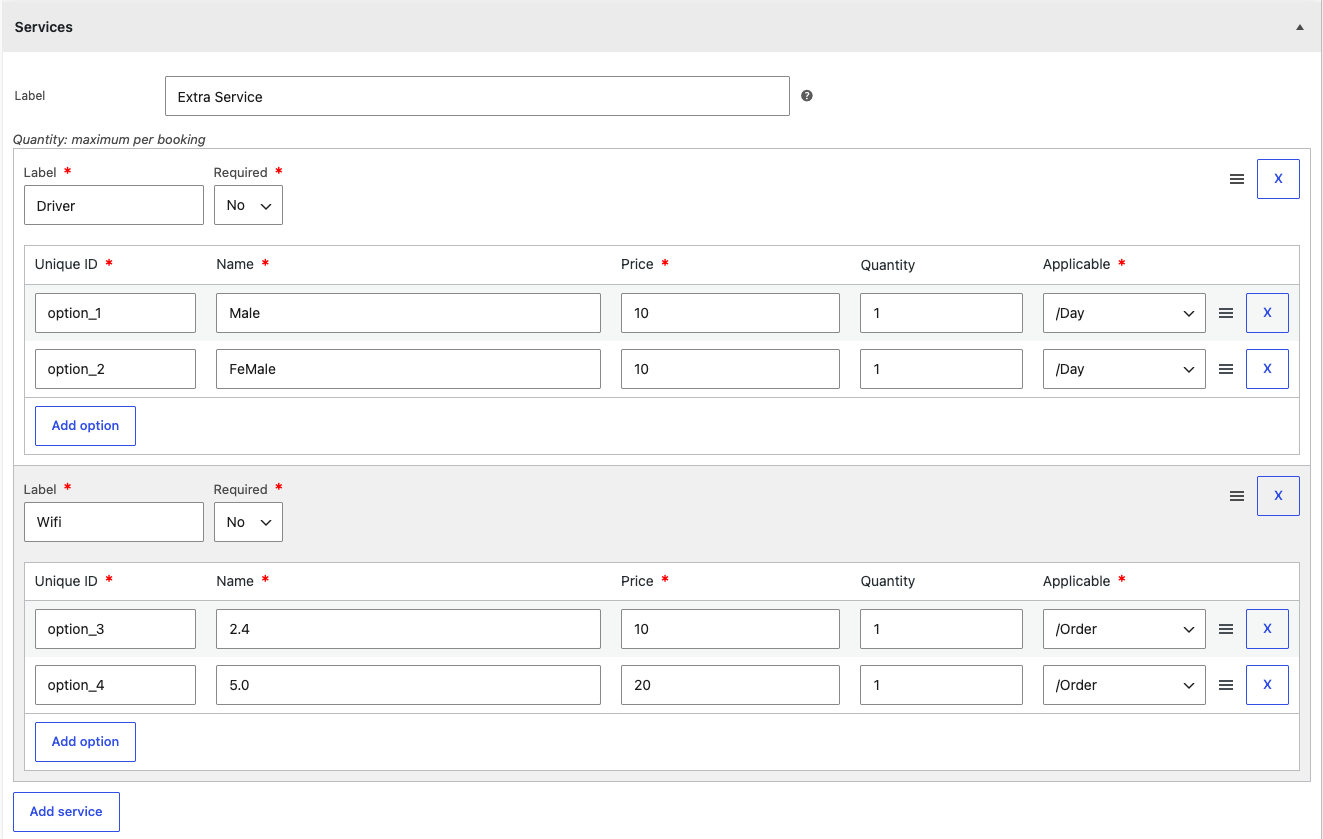
Services lets you offer extra add-on services, each with multiple options for customers to choose from. Create a service group with a label, mark it required or optional, then add options — each with a unique ID, name, price, maximum quantity, and how it's charged (per day or per order). For example, a "Driver" service could offer male or female options. Add as many services and options as you need, and their cost is added to the booking total automatically.
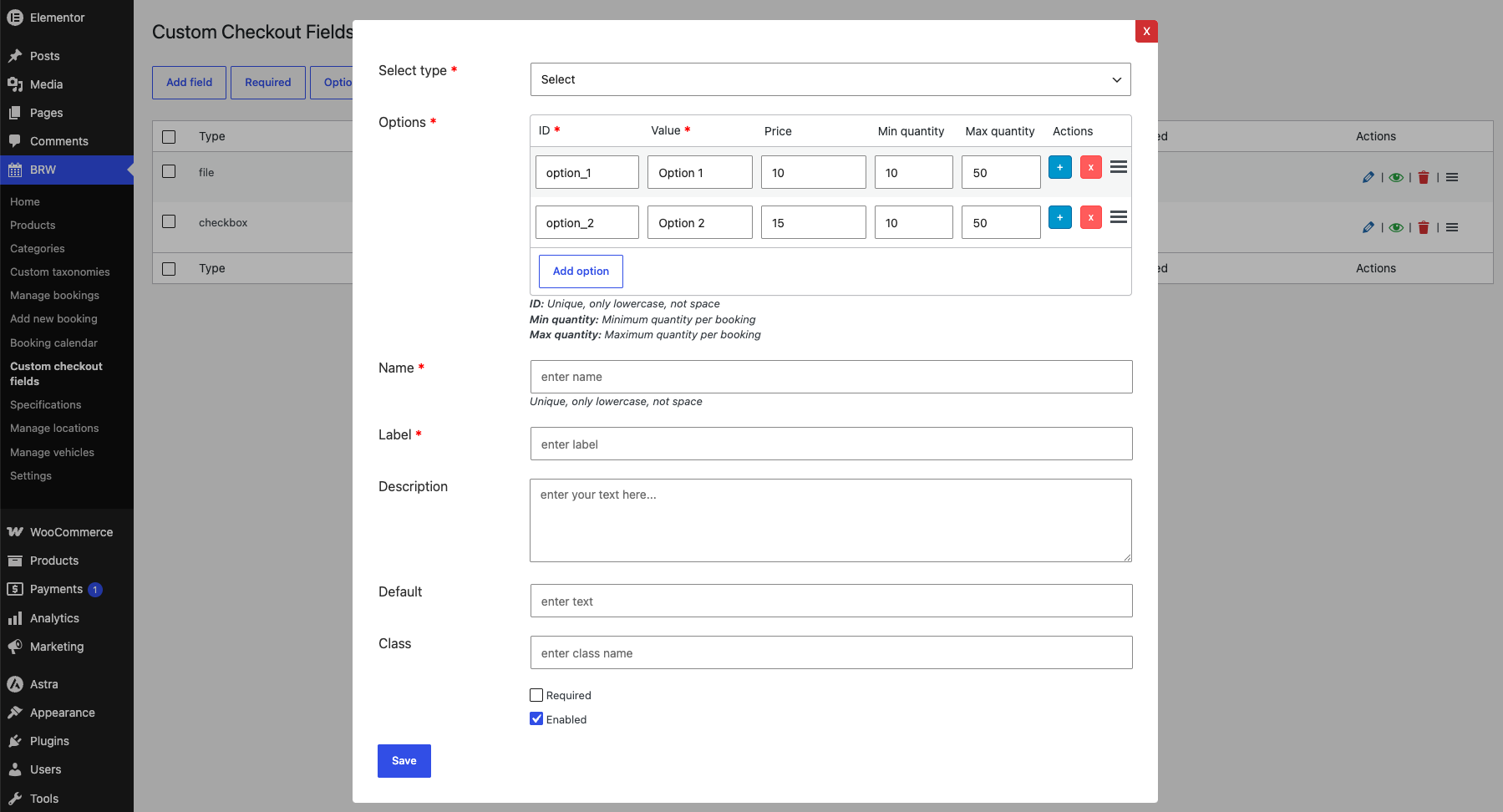
Custom Checkout Fields (CCF) let you add your own input fields to the booking form to collect extra information from customers at checkout — such as a driver's license upload, special requests, or add-ons. The real power is pricing: for Select, Checkbox, and Radio field types, you can set an extra price for each option, so whenever a customer picks it, the amount is added to the booking total automatically. Every option can also carry min/max quantity limits, letting you charge accurately for paid extras. Fields are defined globally, assigned per category, and can be overridden per product, with every entry saved to the booking and shown in the admin order detail.
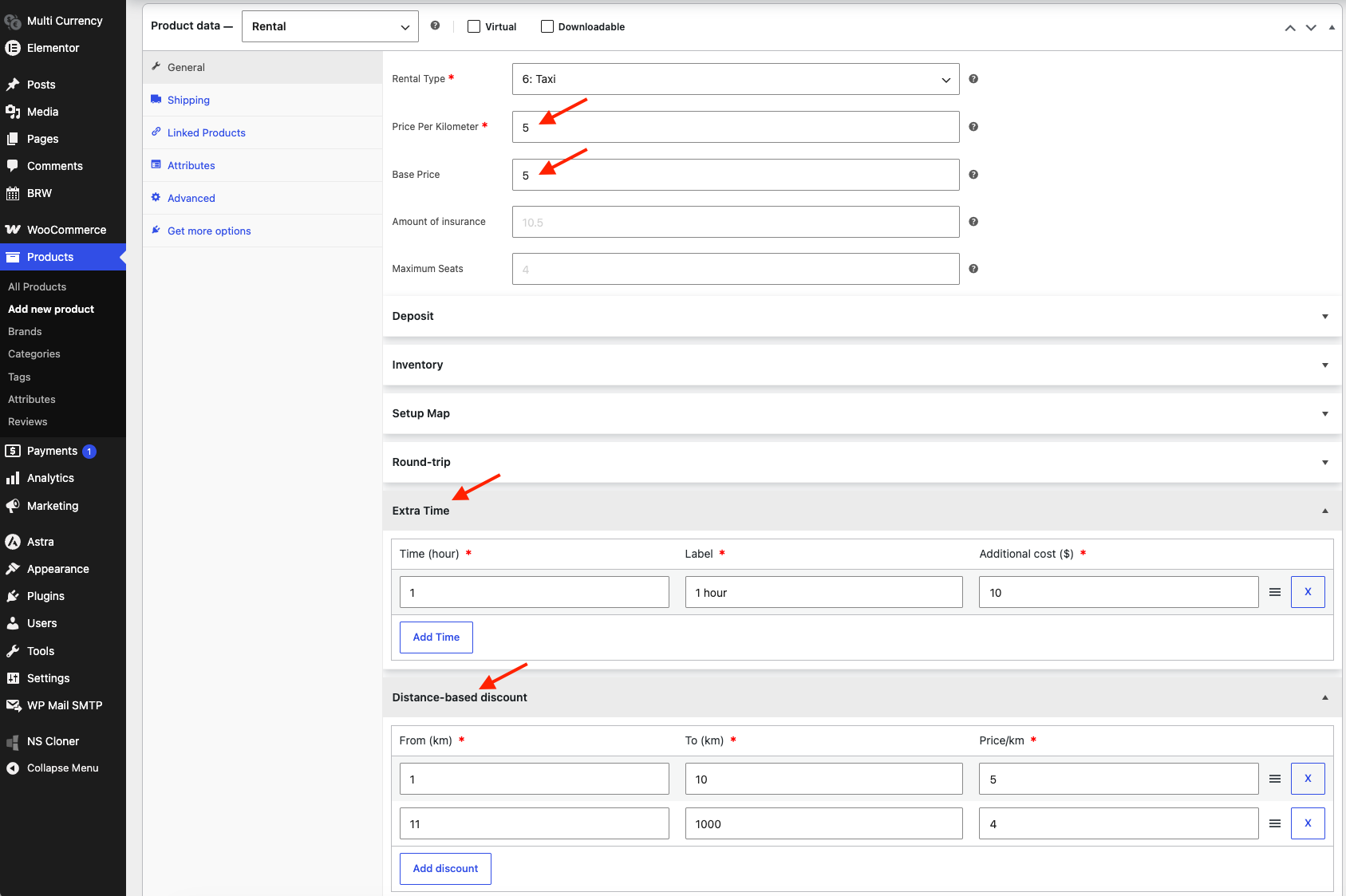
Taxi Pricing is the rental type built for taxi and transfer services, where the fare is calculated by distance. Set a Base Price as the starting fare plus a Price Per Kilometer for the trip distance, then add optional insurance and maximum seats. With Extra Time, you can offer add-on time blocks (e.g. one extra hour) for a fixed additional cost. The Distance-based Discount rewards longer trips by lowering the price per kilometer across set distance ranges — so the further the journey, the cheaper each kilometer becomes automatically.
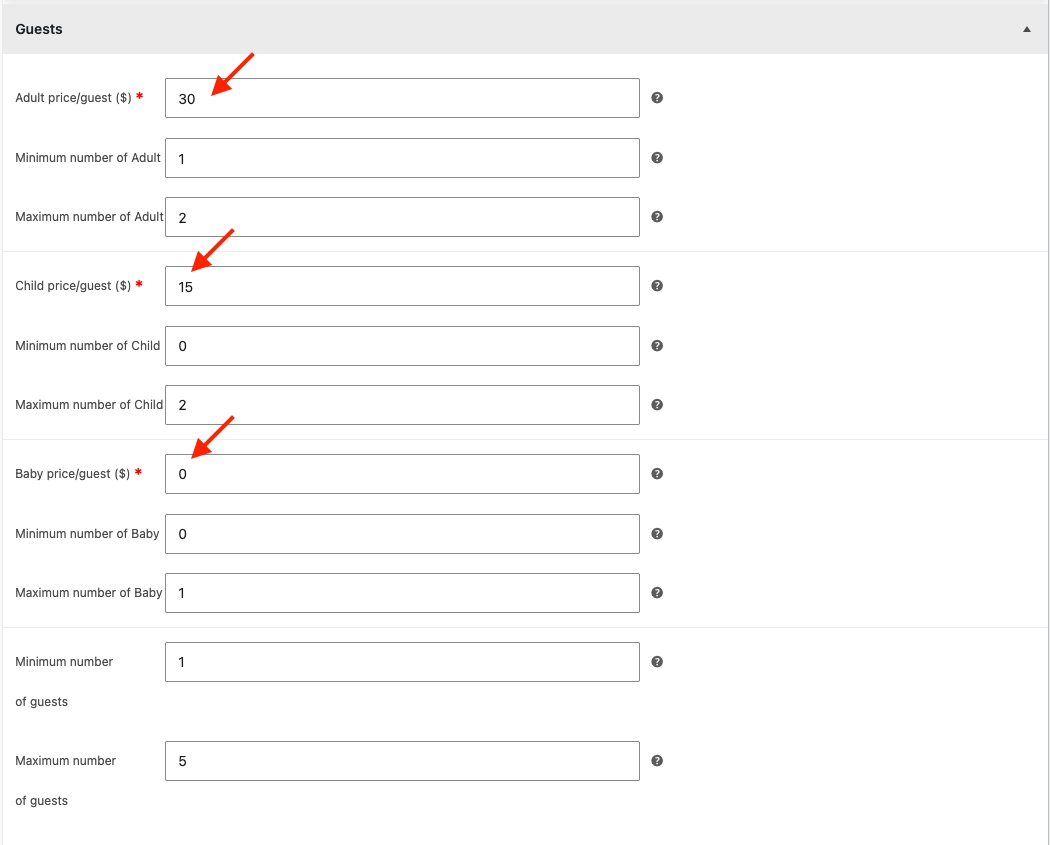
Guests Pricing lets you charge per person by guest type — adult, child, and baby — each with its own price per guest. For every type you can set a minimum and maximum number allowed, plus an overall minimum and maximum number of guests per booking. The system multiplies each guest count by its rate and adds it to the total, so tours and trips are priced accurately based on the group's exact composition.
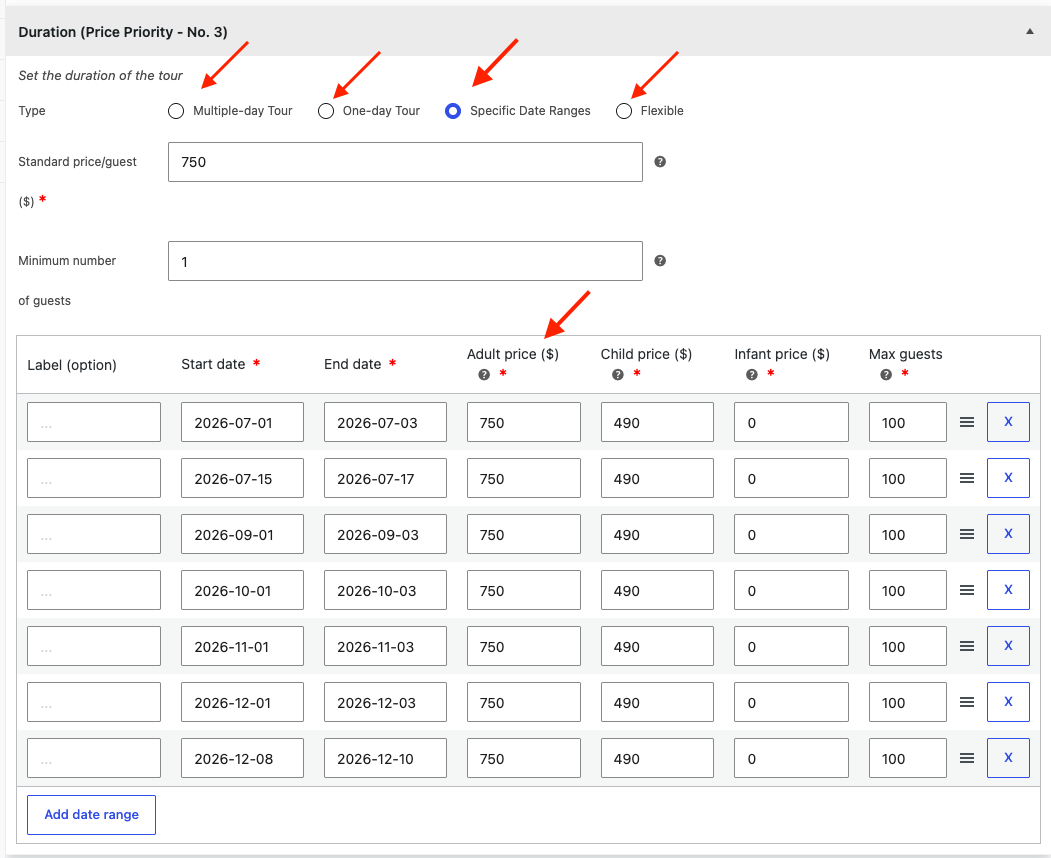
Tour Pricing prices tour bookings per person by guest type (adult, child, infant), and supports 4 duration models: Multiple-day (a fixed multi-day tour), One-day (a single-day tour with departure timeslots), Specific Date Ranges (pre-defined departure windows with their own timeslots and prices), and Flexible (the customer picks any available date and slot). Set a standard per-guest price plus min/max guests, then layer on group-size discounts and date-specific overrides. When a booking date falls inside a specific period, those prices take priority over group discounts and base prices — so seasonal and peak-date rates always apply automatically. The total is each guest count multiplied by its per-person rate.
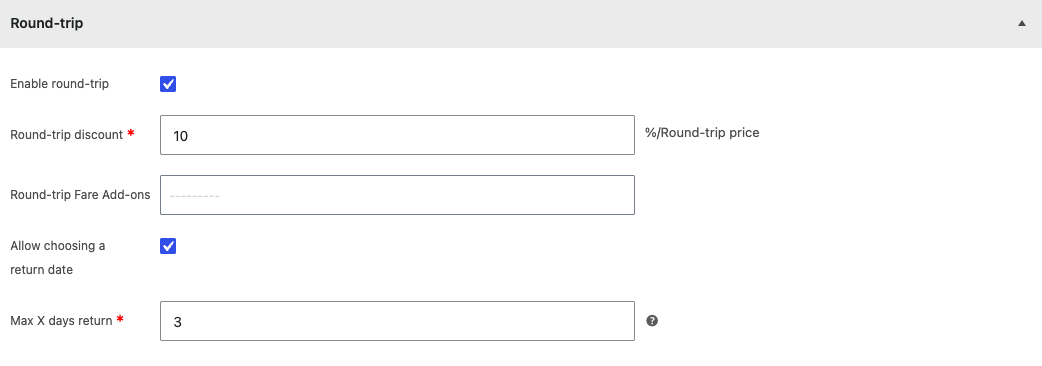
Round-trip lets customers book a return journey in a single order and rewards them with a discount. Enable round-trip, then set a percentage discount applied to the round-trip price, and optionally add a round-trip fare add-on. You can also let customers choose their own return date and cap how far ahead it can be with a "Max X days return" limit — so return bookings stay within the window your business allows.
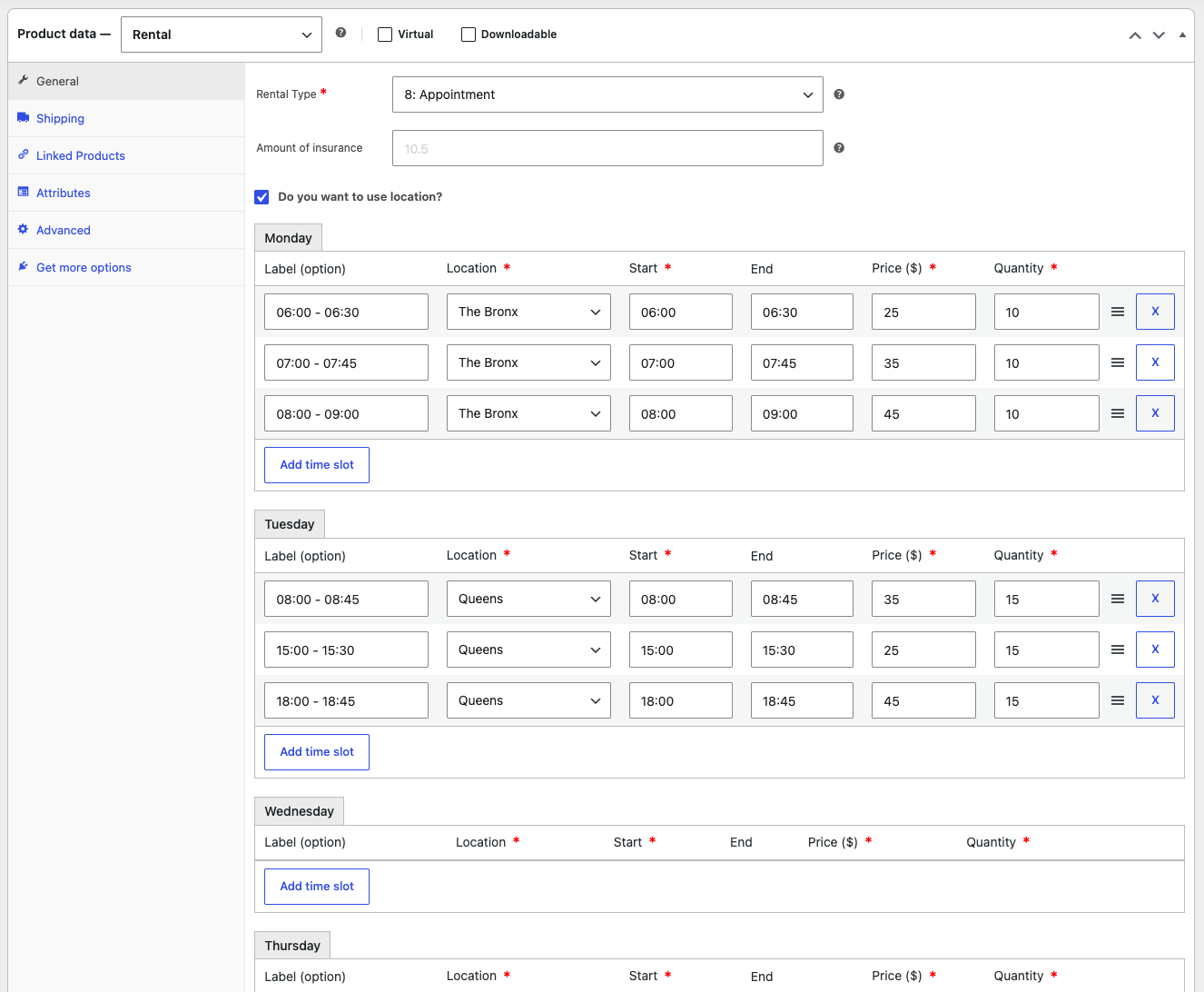
Appointment is the rental type built for service and time-slot bookings. For each day of the week, you define the available time slots — each with a label, start and end time, price, and quantity (how many bookings that slot can take). You can optionally assign a location to every slot and set an insurance amount. Customers then pick a day and an open time slot on the booking form, making it ideal for spas, clinics, consultations, test drives, or any appointment-based service.
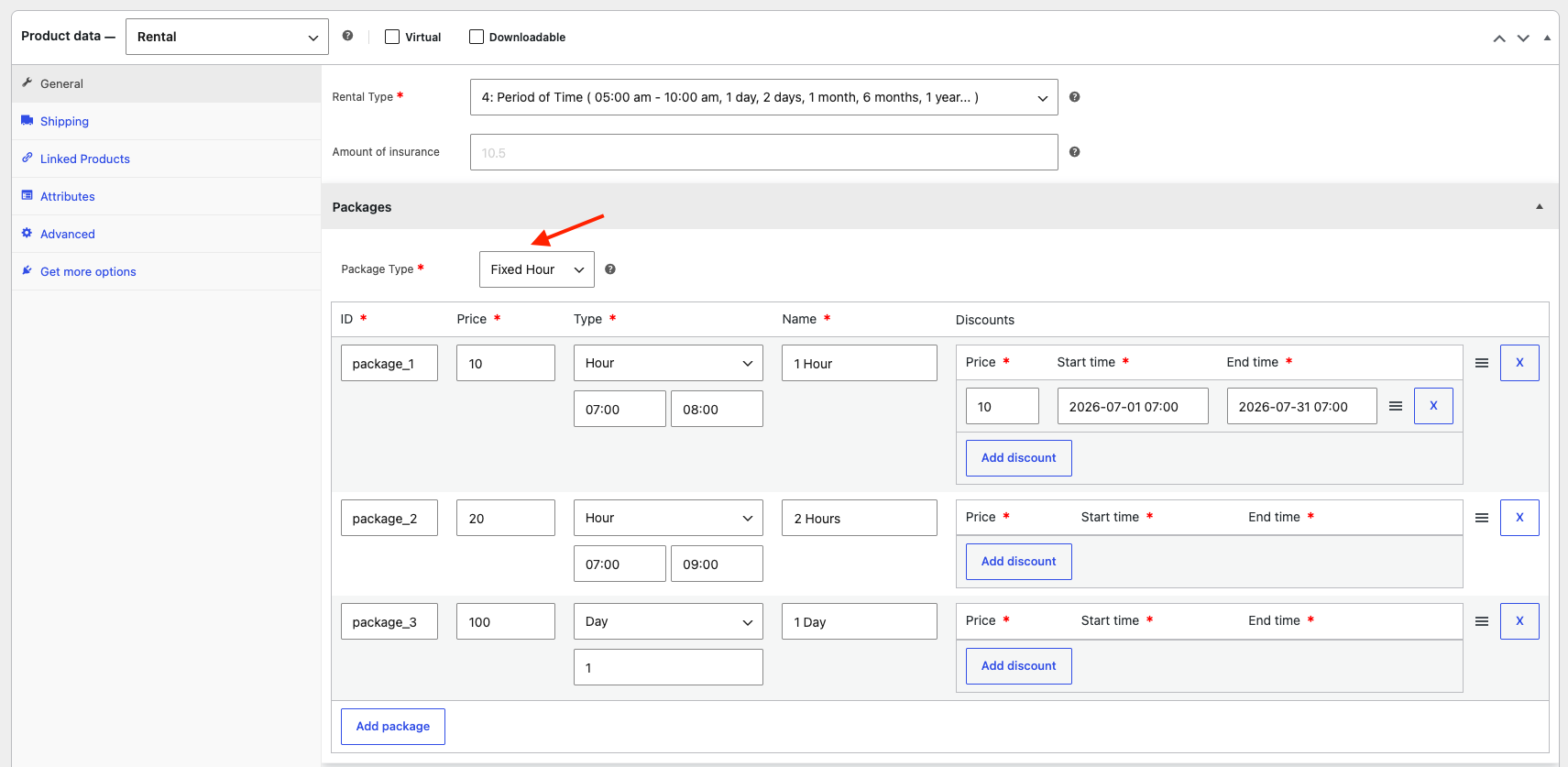
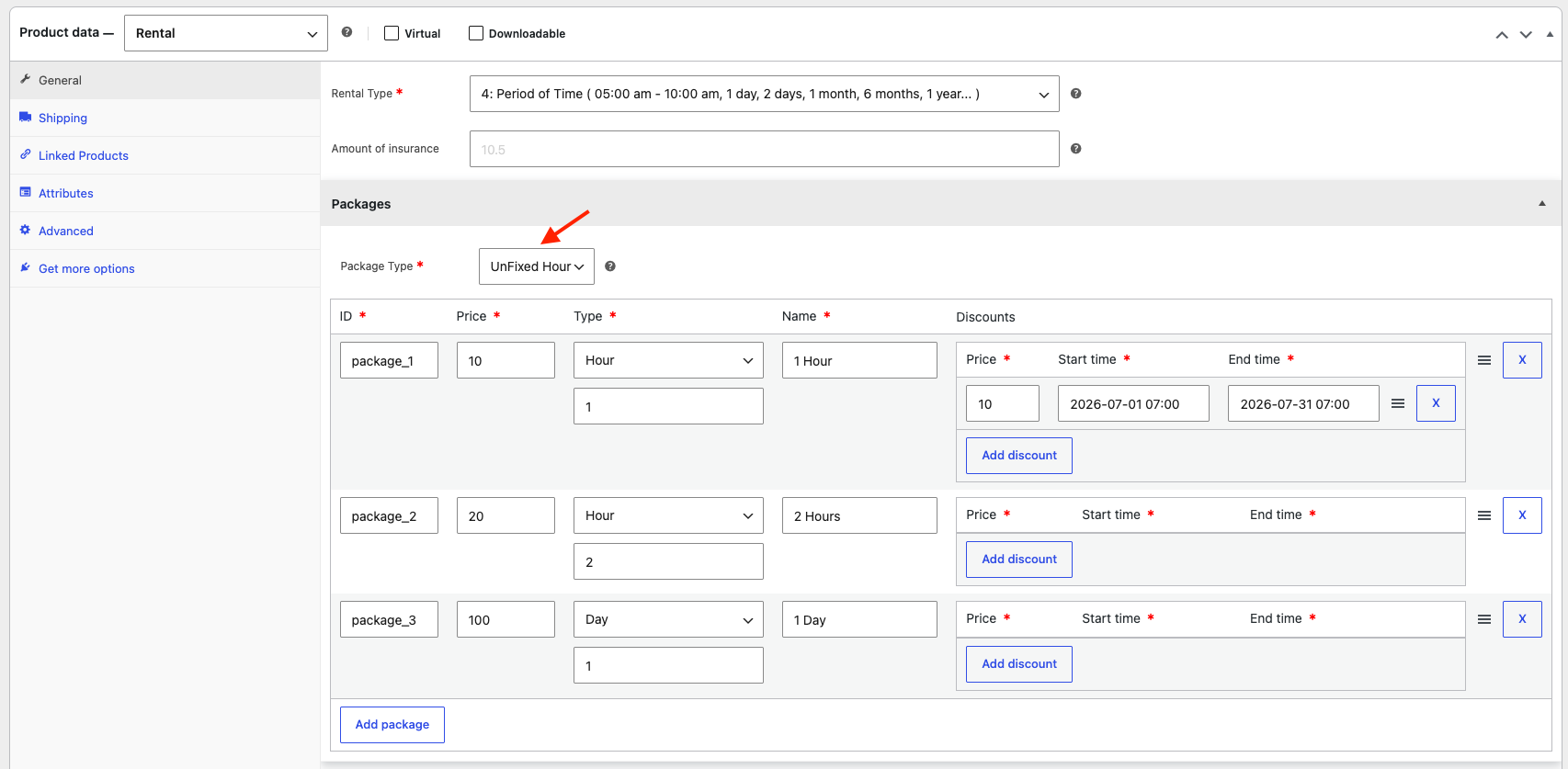
Package Pricing (Period of Time) lets you sell pre-defined rental packages instead of open date ranges — such as 1 hour, 2 hours, 1 day, or longer. Each package has an ID, price, unit type (hour, day, month, year…), name, and optional date-range discounts. There are two Package Types: Fixed Hour, where each package runs within a set start–end time window (e.g. 07:00–08:00); and UnFixed Hour, where you just define the duration (e.g. 1 or 2 hours) and the customer starts it at any available time. Add as many packages as you need, each with its own price and time-limited discounts.
Backend Booking Management
Everything you need to run your WooCommerce booking and rental business — manage orders, availability, and calendars from one backend dashboard.
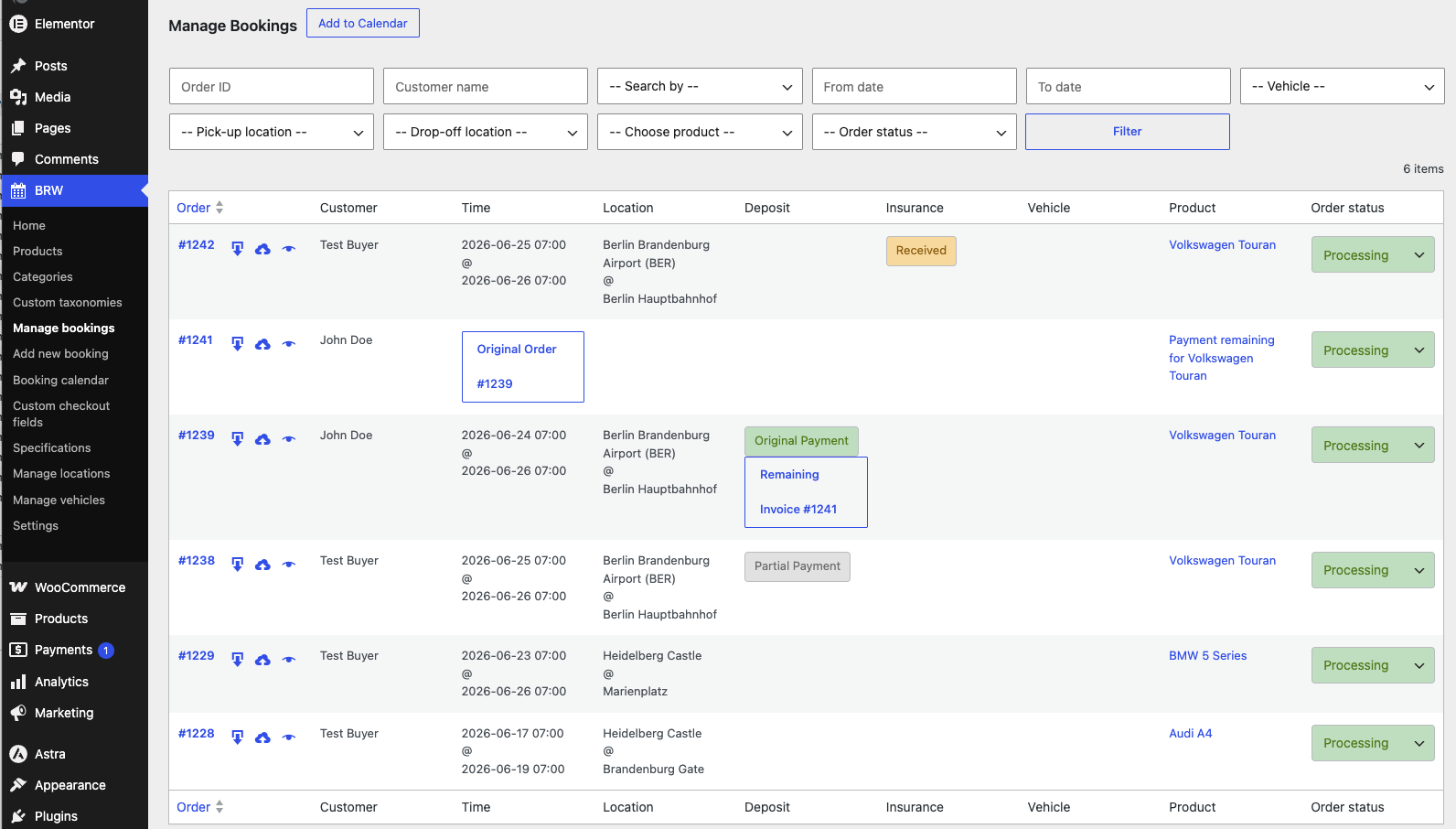
Manage Bookings is the central dashboard for handling every rental and booking order from the WordPress backend. A powerful filter bar lets you search by order ID, customer, date range, vehicle, pick-up/drop-off location, product, or status. Each row shows the key details at a glance — customer, rental time, locations, deposit status, insurance, vehicle, and product. You can update an order's status inline, track split deposit and remaining payments linked to their invoices, and sync bookings to your calendar.
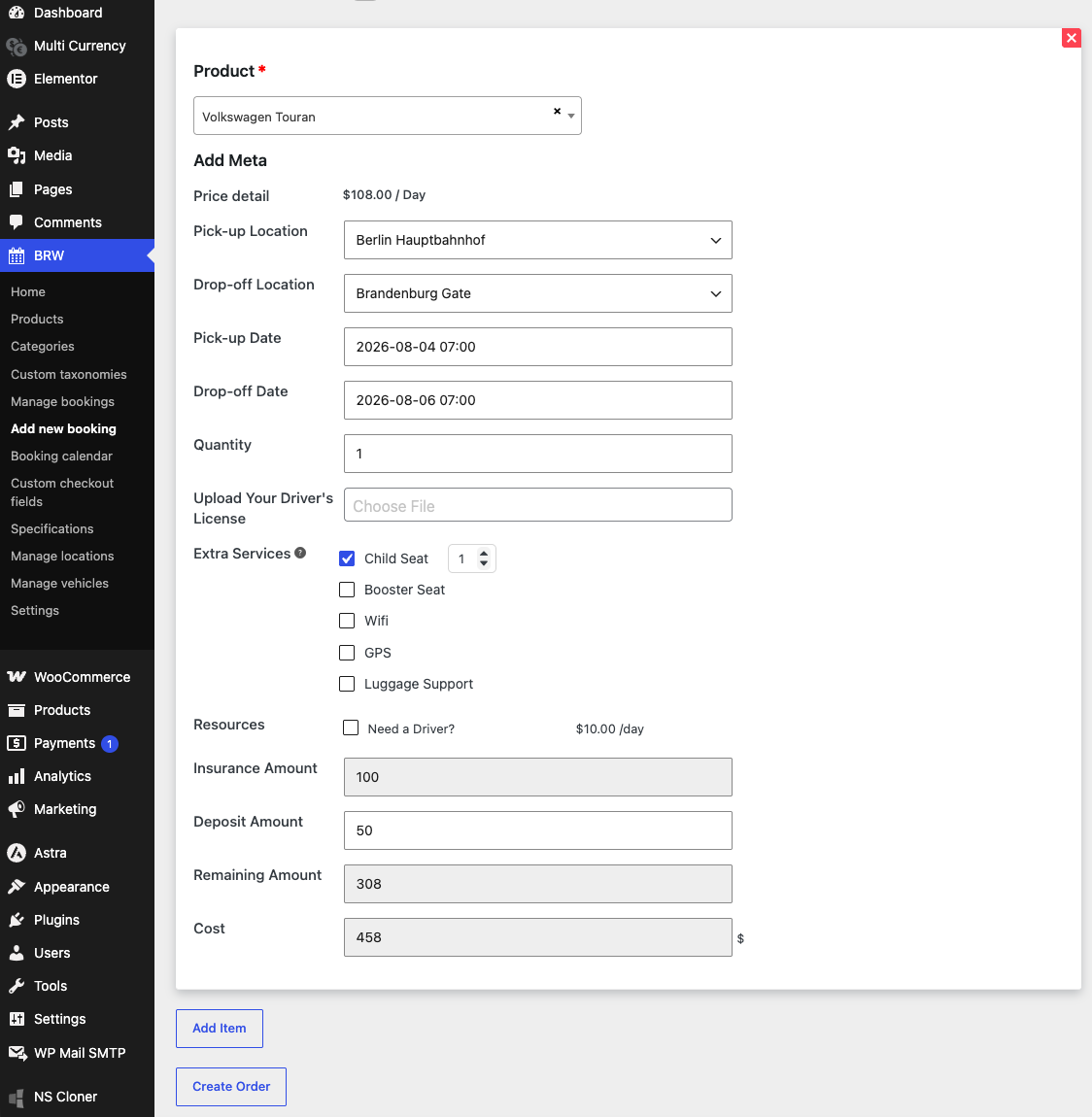
Add New Booking lets staff create rental orders manually on behalf of customers who call, message, or visit your office. When staff select a product, all the fields needed to calculate the price appear automatically, and the insurance amount shows by default when it's mandatory. Staff can also set the deposit amount, so the remaining balance and total cost update instantly before you create the order.
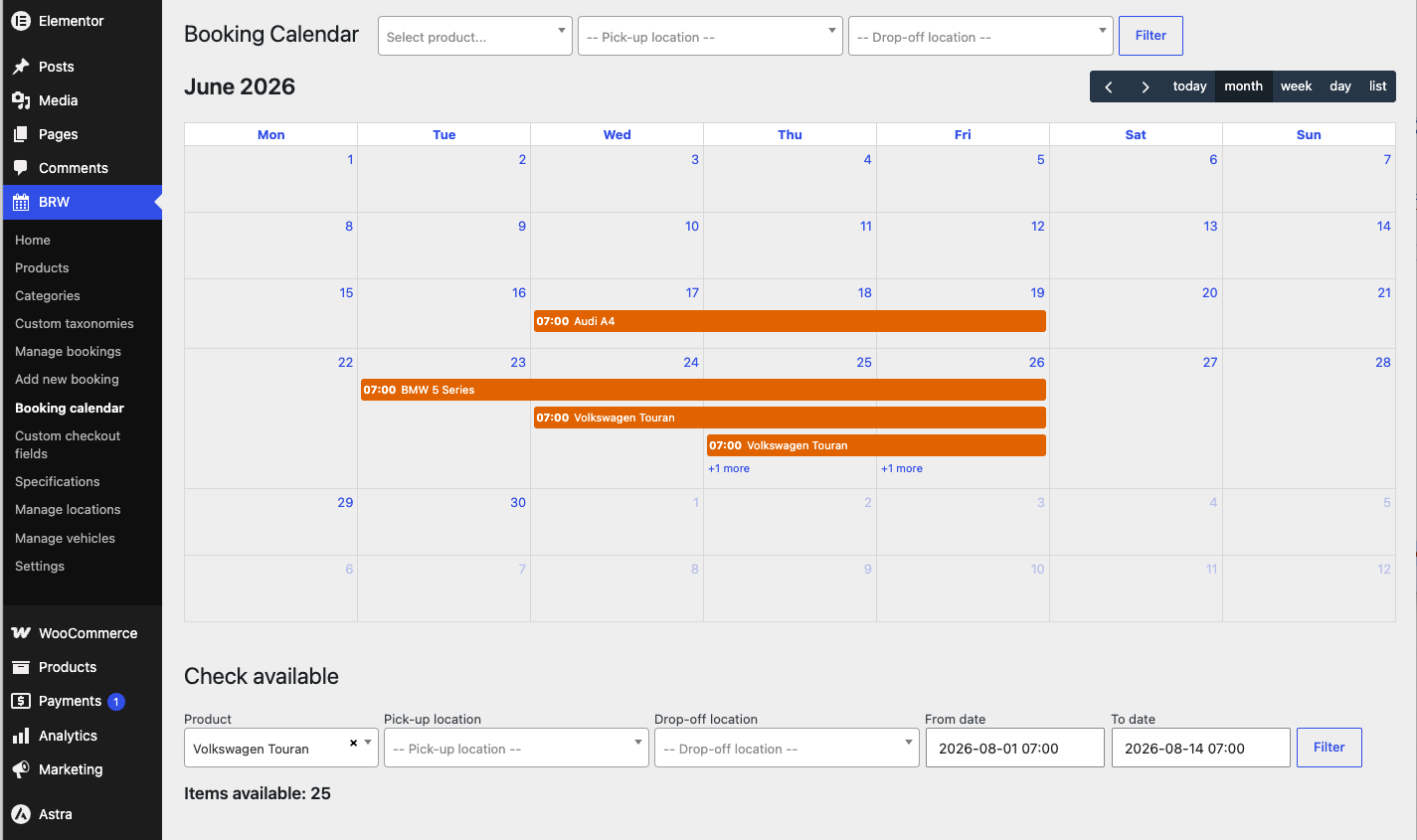
Booking Calendar gives staff a clear visual overview of every reservation in the WordPress backend. View all booked dates across every product at once, or filter by a single product, pick-up, and drop-off location. Switch between month, week, day, or list views to spot busy periods instantly. The built-in "Check available" tool lets you check a specific product's remaining stock for any date range — so you always know exactly how many items are free to book.
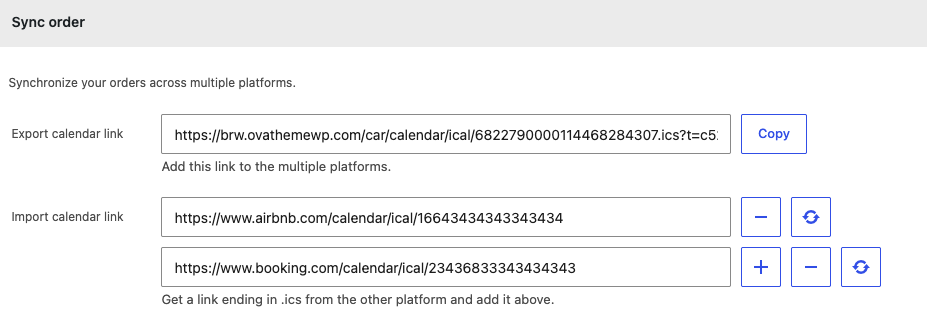
Sync Order keeps your bookings in sync across multiple platforms through two-way iCal synchronization. Export your BRW calendar link and add it to external platforms like Google Calendar, Airbnb, or Booking.com so your reservations appear everywhere automatically. You can also import each platform's .ics link to pull their bookings back into BRW. This two-way sync updates availability in both directions, preventing double bookings and keeping every channel accurate and up to date.
Product Essentials
Everything you need to know about this WooCommerce booking & rental plugin before you buy.
-
1. What’s Included
- Theme File
- Child Theme
- Plugin File
- Documentation
- Demo Data
- Own Plugins
- Access to downloads
-
2. Compatible Browsers
- Chrome
- Firefox
- Safari
- Opera
- Edge
-
3. Compatibility
- WordPress Latest Version
- PHP 8.x
- PHP 7.x
- WooCommerce
- Elementor
- WPML
- Loco Translate Plugin
- Polylang
- GTranslate
- CURCY - Multi Currency for WooCommerce
- WPBakery Page Builder
-
4. Documentation
-
5. Support
- Monday - Saturday
- 24h Response Time
- Support via Forum
- Support via Email
-
6. Changelog
- Version 2.0.5
- 11 September 2026
- Read changelog file
Version history
- N = new
- U = update
- D = dev
- F = fix
- R = remove
- O = other
-
7. License
- 12 Months Update
- 12 Months Supports
Need Help?
Our support team is here for you
14 Days Money Back Guarantee!!!
Get a full refund as long as your request meets the conditions in our refund policy.
Powerful Features for Advanced Booking Websites
Everything you need in a WooCommerce booking and rental plugin — flexible pricing, deposits, availability rules, calendar sync, and Elementor elements. See the docs or video for details.
Pricing & Payment
- Daily pricing
- Hourly pricing
- Mixed pricing
- Period-based pricing
- Route-based pricing
- Distance-based pricing
- Deposit payment
- Insurance fee
- Group pricing
- Seasonal pricing
Booking Experience
- Booking form
- Request booking form
- Custom checkout fields
- Extra services
- Resource options
- Advanced search
- Responsive design
- Elementor elements
Availability & Rules
- Allowed dates
- Disabled dates
- Preparation days
- Minimum booking days
- Maximum booking days
- Booking reminders
- Cancellation policies
Management Tools
- Manual booking
- Backend calendar
- Inventory management
- Backend search
- Invoice generation
- Import/export locations
- Custom taxonomies
- Sync Bookings Across Platforms
- Multiple shortcodes
Frequently Asked Questions
Do you have a question about product? See our most frequently asked questions. If your question is not listed below, please contact us.
What is WooCommerce Booking Plugin for Rentals and Services - BRW ?
BRW is a WooCommerce plugin that turns your WordPress site into a fully functional online booking and rental platform. It is designed for hotels, car rentals, travel agencies, tour operators, and appointment-based businesses — letting customers search availability, choose dates, and pay — all from your own website.
Does BRW require WooCommerce?
Yes. BRW is built on top of WooCommerce and requires it to be installed and activated. All payments, orders, and invoices are handled through WooCommerce, so you can use any payment gateway that WooCommerce supports — including Stripe, PayPal, and many others.
What types of rental businesses can use BRW?
BRW supports a wide range of business types through its rental type system:
- Car / vehicle rental — daily or hourly fleet rentals with vehicle ID tracking
- Hotel / accommodation — room bookings with check-in/check-out dates and guest counts
- Travel agency / tours — fixed-duration packages or multi-day itineraries
- Taxi / transportation — point-to-point transfers with Google Maps autocomplete
- Appointment booking — time-slot scheduling for services, clinics, studios, etc.
- Mixed & period-time rentals — flexible configurations combining multiple models
Is BRW compatible with my theme and page builder?
BRW is built as a standalone WooCommerce plugin and outputs standard HTML. It is compatible with most WordPress themes. For page builders (Elementor, WPBakery, Gutenberg blocks), you can place any BRW feature on your pages using shortcodes — 27 shortcodes are included to embed booking forms, search widgets, calendars, and product sections anywhere.
Can I add custom fields to the booking form?
Yes. BRW includes a Custom Checkout Fields manager (BRW → Custom Checkout Fields) where you can add unlimited custom fields to the booking form. Supported field types include text, number, textarea, select, radio, checkbox, file upload, date picker, and a price add-on (range slider). Fields can be assigned globally, by category, or overridden per product.
How does pricing work? Can I set different rates by date or season?
BRW supports flexible pricing models at the product level, including:
- Base price — flat daily / hourly rate via WooCommerce regular price
- Duration-based pricing — different rates for different rental lengths (e.g. 1–3 days vs. 4–7 days)
- Seasonal / date-range pricing — custom price rules that apply during specific date windows
- Extra services pricing — add-ons with their own prices attached to booking options
- Custom Checkout Field add-ons — price fields that increase the order total based on customer selection
Does BRW sync with Google Calendar or other platforms?
Yes — BRW now supports syncing bookings with Google Calendar, iCal, and multiple external platforms, so you always have an up-to-date view of your availability everywhere you need it.
Does BRW support Google Maps for location-based search?
Yes. The Taxi and Transportation search shortcodes integrate with the Google Maps Places Autocomplete API so customers can type a free-form pickup and dropoff address. You supply a Google Maps API key in the plugin settings. You can also restrict autocomplete to a specific country or geographic bounds.
Can I manage vehicle inventory individually (by vehicle ID, not just quantity)?
Yes. Each vehicle product offers two inventory modes:
- Automatically — tracks total stock count. Customers see a quantity input.
- Manually (by Vehicle ID) — you define named individual units (e.g. “Toyota Camry – ABC-123”). Customers select a specific vehicle from a dropdown at checkout, and availability is tracked per unit.
The Manual mode is ideal for car rentals, boat rentals, and any fleet where tracking individual assets matters.
I found a bug or need help — how do I contact support?
For the fastest help, please submit a support ticket through our website rather than emailing directly. Include your WordPress admin details (and screenshots, if relevant) so our team can diagnose and resolve your issue quickly.
My business has a unique requirement not covered by the plugin — can you build it for me?
Yes! We offer custom development for specific business requirements. Contact us through our website to discuss your needs and get a quote.
Your Benefits
Everything included with your purchase.
-
Download the product package immediately after successful payment.
-
14-day refund policy
-
12 months of support and updates
-
Online documentation included
-
Secure checkout & instant access
Safe payment, instant access, and reliable support.
Related Products
The theme uses the BRW plugin to power its core functionality, and the BRW add-on to build the multi-vendor feature.
-
Multi-Vendor Rental Marketplace – BRW WCFM
Turn your BRW rental site into a multi-vendor marketplace. Let vendors list, book and manage car, bike, hotel and tour rentals from the WCFM dashboard.
Review & Rating
See what customers think about this WooCommerce booking and rental plugin — real ratings and reviews to help you buy with confidence.

Ich habe noch nie im Leben einen so perfekten Kundendienst und Service erlebt. Diese Jungs und Mädels sind echt Klasse. Die Antworten auf die Fragen kommen so schnell, das man es schon fast “Echtzeitkommunikation” nennen kann! Und das buchungsplugin ist auch der Hammer. Es funktioniert sehr gut ist unglaublich anpassbar und sehr zufriedenstellend. Kurzum, Das ist eine sehr, sehr gute EntwicklerFirma!
Danke
Rolf
This plugin is very flexible and a must buy.
The good about this plugin is the customer support.
They help me with every problem that i had.
It’s a great plugin, just to be able to make a back-end reservation and not pay more for it or having to search for another integration is a huge plus for me. The back-end calendar and control of the rental with Filters also help a lot with organization.
There are some optimizations to be made here and there, you’ll notice the admin tabs getting slower if your product has tons of drop-off and pick-up locations configured, but honestly, not too much of a hassle as of now. It could also have some kind of integration with Google Sheets.
All in all, great product, really got my money worth, and I also have to talk about the great support offered. I got answers on a Sunday, and they got back to me as quick as they could to understand what issues I was having. Thanks.
Great plugin, with many flexibility to use. Customer and customization support is prompt!
Plugin works fine and has almost every thing a rental booking system need, the support give help almost to any question and works with either on any special request ( as in my case still working with me on my special requirements ) for me best value for money.
Add a review Cancel reply
You must be logged in to post a review.

We sell WordPress digital products, including themes and plugins.
From the moment I installed BRW, I was impressed by its seamless integration with woocommerce and intuitive interface. Setting up my rental listings was a breeze, thanks to the user-friendly dashboard and helpful documentation provided by the BRW team.
One of the standout features of BRW is its flexibility. Whether you’re renting out properties, equipment, or anything in between, BRW adapts effortlessly to your needs. Customizable booking calendars, flexible pricing options, and robust backend make it easy to tailor the plugin to fit your unique business requirements.
But what truly sets BRW apart is its outstanding support team. Whenever I had a question or encountered an issue, the BRW support team was there to help, offering prompt and knowledgeable assistance every step of the way. Their dedication to customer satisfaction is truly commendable and has made my experience with BRW all the more enjoyable.
In addition to its powerful features and excellent support, BRW is also incredibly affordable, making it accessible to businesses of all sizes. With BRW, you can maximize your rental revenue.